

Showing posts with label Facebook Tricks. Show all posts
HACK FACEBOOK FRIEND REQUEST WHEN BLOCKED
Facebook friend request sent when blocked. Guyz, If ur frnd request is Blocked, then simply follow the steps.
Imagine that you are blocked from sending Friend Requests by Facebook for 2, 4, 7, 14 or even 30days! That would be a serious problem if you actually wanted to add someone during that period. Now, you can! With this simple trick you can send 1000′s of friend requests when when you are blocked . There’s just one part which will be tough for you if you are going to add unknown people. You will need the Email address of the person you want to add. If u r thinking of adding too many
people then it would be better that you create a contact file.
The easiest way to create a contact file, here it is:
1. Open a New text document (.txt) in Notepad.
2. Add all the email addresses separated by a comma (‘,’)
3. Now save that file with the extension .vcf
Now, this new file is your contact file. Upload it to Facebook by photo upload option on ur timeline and you will be prompted to send friend request. Click ‘OK’ and that’s it,
You are done!
Simple yet effective!
Imagine that you are blocked from sending Friend Requests by Facebook for 2, 4, 7, 14 or even 30days! That would be a serious problem if you actually wanted to add someone during that period. Now, you can! With this simple trick you can send 1000′s of friend requests when when you are blocked . There’s just one part which will be tough for you if you are going to add unknown people. You will need the Email address of the person you want to add. If u r thinking of adding too many
people then it would be better that you create a contact file.
The easiest way to create a contact file, here it is:
1. Open a New text document (.txt) in Notepad.
2. Add all the email addresses separated by a comma (‘,’)
3. Now save that file with the extension .vcf
Now, this new file is your contact file. Upload it to Facebook by photo upload option on ur timeline and you will be prompted to send friend request. Click ‘OK’ and that’s it,
You are done!
Simple yet effective!
Read More »
Labels:
Facebook Tricks
How to Unfriend Facebook Friends in Bulk/Mass
Facebook is
the biggest social networking platform and you make it more by creating
your heavy profile friends list. Usually in a day a person normally
adds 3 to 4 friends a day and this list simply goes on well there is
obviously a limit of adding 5000 friends in a profile so you cannot
exceed that limit but sometimes you need someone to be added than others
and removing friends in Facebook is a pretty hard deal so we found an
interesting userscript which can do this job like that. FacebookDeletes is the userscript for chrome and Firefox ( well for Firefox you will need Greasemonkey installed
) which does this job really easily, just installing it and giving it a
command for deleting your whole bunch of friends list.
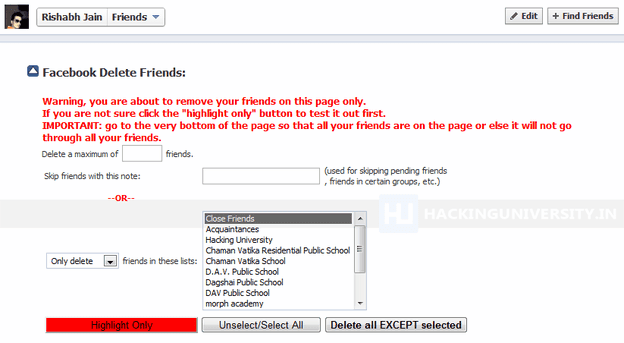
Now you can just click on Highlight Only which will automatically mark your friends on that page and than you can click on Delete all Except selected and than your friends will start deleting. They also have a option to delete your friends just from the groups you have created well you can figure everything when you will have that script installed.So after you will install this userscript you just need to visit the Facebook Friends Page where you will see all your friends just click that downwards arrow like above and you will see that page like above in the image.
Now you can just click on Highlight Only which will automatically mark your friends on that page and than you can click on Delete all Except selected and than your friends will start deleting. They also have a option to delete your friends just from the groups you have created well you can figure everything when you will have that script installed.So after you will install this userscript you just need to visit the Facebook Friends Page where you will see all your friends just click that downwards arrow like above and you will see that page like above in the image.
Read More »
Labels:
Facebook Tricks
How to Delete Strangers Facebook Account
You
might wanna kill someone due to some really angry thing he attempted
on you but killing is simply illegal and you cannot attempt that thing,
but now question arises how to kill someone without getting noticed
and caught, well the simple answer is delete his or her Facebook
profile he will be automatically ruined because Facebook is heart for
some people now days.
Well
so today I am going to teach you a small method for deleting any ones
Facebook Profile. Well this trick includes mainly Social Engineering
you have to be a confidence person to attend any employee from Facebook
Team and answer all their questions confidently.
Follow the below steps to see how it works .:
1. The first and the most important thing is the victims Facebook Username you can get that easily.
2. The next thing you need His/Her Email which he/she uses to sign in to his Facebook Account.
3. His/Her birth date which he/she has filled in his/her Facebook Profile.
4. Now simply create a fake Email ID on Gmail or yahoo with the First Name & Last Name same as on victim’s Facebook Profile.
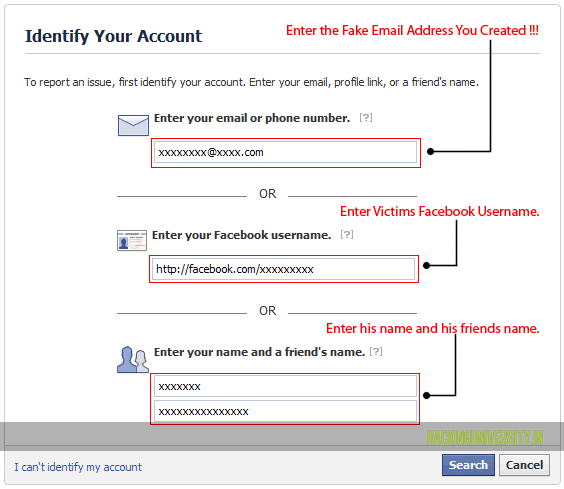
5. Now visit the Facebook Issue Reporting Page you will see something like below .:
6.
Now as mentioned in the image fill all the data like above with your
Fake Email Address and all other things and than click on continue.
7.
Now you will get mail on your Fake Email Address entered above from
Facebook Team asking you about the issue, tell them that you don’t have
access to your account and someone has hacked your account and he is
spoiling all your reputation and he is a threat to your profile, so you
have to mail them convincing to disable and than delete your account.
8.
Now after 2-3 days you will get mail from Facebook Team asking you
that have you gained access to your Facebook profile, reply them you do
not have any access to your Facebook profile and ask them to disable
your account so that hacker have no access to the profile.
9.
Now after 1-2 days you will get an Email that your account is
disabled, and that’s we wanted to do and now if it will not be accessed
for a while it will automatically be deleted.
So now enjoy and have fun, if you liked this post make sure to like it and share it with all your friends.
Read More »
Labels:
Facebook Tricks
Hack For Tracing Facebook User Location While Chatting
If You have unknown friends in your facebook account and then after some
time, when you know that he/she is a fake person then with the help of
this facebook tricks you can trace his IP address and area. I often
accept many unknown friend requests, one day i get into a big problem
from a unknown friend of mine. He start abusing me .Then i do some
research work and i come to know about this facebook trick and with the
help of this PC Trick i came to know that the unknown one is my own
friend and he just make a fake ID on facebook...
HERE IS THE TRICK....
1. First you got to find out the IP address of that User.
To Do so we will be using “netstat” command in windows for this pc trick. If you want to know the IP address of a specific person on facebook or orkut or any chat service, there is only one way: Just invite or ping him for a chat and while chat is ON open ‘Command Prompt‘ on your PC (Start >Run>cmd).
Note: before trying this make sure you close all the other tabs in your browser. and only facebook is open. also if possible delete all the history and cache from your browser.
Now the next step that you have to do for this facebook trick is opens the command prompt Type the following command and hit Enter.
netstat -an.. or you can read my older hack trick to know the ip address of other...
And you will get all established connections IP addresses there. Note down all the suspicious IP’s
2.The Next PC Trick is to trace that user using his IP address:
To do this facebook tricks we will be using IP tracer service. For this Go to the following address : http://www.ip-adress.com/ip_tracer/
and paste the IP address in the box that says “lookup this ip or website”. and it will show you the location of the user.
It will show you all the information about that user along with his ISP and a Location in the MAP. Now in the MAP Just click on “click for big ip address location” in the big picture you can actually zoom in. and try to recognize the area. If any serious matter just note down the ISP details in that page and contact them about the IP. they will respond you. Use this facebook trick if you are in aproblem with some unknown friend.
HERE IS THE TRICK....
1. First you got to find out the IP address of that User.
To Do so we will be using “netstat” command in windows for this pc trick. If you want to know the IP address of a specific person on facebook or orkut or any chat service, there is only one way: Just invite or ping him for a chat and while chat is ON open ‘Command Prompt‘ on your PC (Start >Run>cmd).
Note: before trying this make sure you close all the other tabs in your browser. and only facebook is open. also if possible delete all the history and cache from your browser.
Now the next step that you have to do for this facebook trick is opens the command prompt Type the following command and hit Enter.
netstat -an.. or you can read my older hack trick to know the ip address of other...
And you will get all established connections IP addresses there. Note down all the suspicious IP’s
2.The Next PC Trick is to trace that user using his IP address:
To do this facebook tricks we will be using IP tracer service. For this Go to the following address : http://www.ip-adress.com/ip_tracer/
and paste the IP address in the box that says “lookup this ip or website”. and it will show you the location of the user.
It will show you all the information about that user along with his ISP and a Location in the MAP. Now in the MAP Just click on “click for big ip address location” in the big picture you can actually zoom in. and try to recognize the area. If any serious matter just note down the ISP details in that page and contact them about the IP. they will respond you. Use this facebook trick if you are in aproblem with some unknown friend.
Read More »
Labels:
Facebook Tricks
Subscribe to:
Posts (Atom)


![How To Hack Whatsapp [Tutorial] - Whatsapp Sniffing App](https://lh3.googleusercontent.com/blogger_img_proxy/AEn0k_t9gwWJ9DX9Y0sPgb-uoJL7GMzG2xCCnOg2RvN7u_j1M1l6LmgDJyj89s48JPV4UXhYcci3XMHcINElEF6DvRkmaXEhcj6XmV-i1pj0e1ogmxw)
![WHATSAPP HACK - SPY TOOL - With PROOF! [FEBRUARY 2013] NO SURVEYS](https://lh3.googleusercontent.com/blogger_img_proxy/AEn0k_sARyIhoQsZnhEQJFREvyOkqeJu5nTwtbzmlWnqQbEXO-xwFj1qr6sp3EVhR9Uql5a770-TKD8H-kRyK0_gWiWlJGQNyU4GSsuRgqP4KVEdCeo)
